17 Best Color Analysis Apps in 2026
We tested the leading AI color analysis tools on accuracy, depth, ease of use, and value. Here are the best options for 2026.
| # | App | Best For | Price |
|---|---|---|---|
| 1 | Hathaura | Pro Stylist Platform | Guides from $9.99; pro platform from $34/month. |
| 2 | ColorSnap AI | Free Instant Result | Free. |
| 3 | ColorMine AI | for AI Virtual Try-On | Free web tools; paid iOS app. |
| 4 | Dressika | All-in-One Style App | Free with paid features. |
| 5 | Hazel & Hue | Quick Free Web Analysis | Free. |
| 6 | Colorwise (My Best Colors) | Virtual Draping | $14.99 one-time. |
| 7 | Vivaldi Color Lab | for Comprehensive Discovery | Free version with premium upgrade. |
| 8 | Palette Hunt | for Previewing Styling Decisions | Free with paid features. |
| 9 | Style DNA | for Shopping Guidance | Free with paid features. |
| 10 | My Color Analysis AI | Simple iOS App | Free with paid features; iOS app. |
| 11 | ColorAnalysisTech | Free Draping Previews | Free web tool; paid app. |
| 12 | Beauty AI | for Real-Wardrobe Application | Free with paid features. |
| 13 | YouCam Makeup | Makeup Try-On + Color | Free with in-app purchases. |
| 14 | Facetune | for Existing Users | Subscription. |
| 15 | ColorEnalysis.com | Free Quiz (No Photo Needed) | Free. |
| 16 | Indigo Tones | for Shopping Your Season | Varies (analysis + retail). |
| 17 | House of Colour | Established In-Person Brand | Session-based (typically $100–$400+). |
Hathaura
Best Pro Stylist Platform
Hathaura is the only tool on this list that works at both ends of the market. For consumers, it offers detailed, season-specific color guides — comprehensive references covering wardrobe colors, neutrals, colors to avoid, makeup, hair, and jewelry, so you're not left guessing after you get your season. For professionals, the Hathaura platform lets stylists and color analysts run a structured 12-season analysis and generate a beautiful, branded PDF report with their own business name on it — turning a single session into a premium client experience.
With 800+ color guides sold and hold a 4.8★ rating, which makes Hathaura one of the few options here with a public, verifiable track record rather than just accuracy claims. The 12-season system is grounded in real color theory (hue, value, chroma), and professionals retain full control to confirm or override results.
Pros
- +12-season system grounded in real color theory
- +Branded PDF reports for professionals
- +800+ guides sold with 4.8★ rating
- +Verifiable public track record
Cons
- −Pro platform requires subscription ($34/mo)
- −Not a quick free selfie analysis
ColorSnap AI
Best Free Instant Result
ColorSnap AI is a fast, free, photo-based tool that identifies your color season in seconds. No quiz, no gatekeeping, no signup hoops — upload a photo and get your season instantly. It's the ideal starting point if you're new to color analysis and just want a quick, accurate read before deciding whether to go deeper with a full guide or a professional session.
Pros
- +Completely free
- +No signup required
- +Instant results
Cons
- −Season only — no application guidance for makeup/wardrobe
ColorMine AI
Best for AI Virtual Try-On
ColorMine AI pairs photo-based seasonal analysis with realistic AI-generated virtual try-on for makeup and clothing, plus the comprehensive 12-season system. It offers free web tools alongside a paid iOS app, and leans heavily on accuracy claims — stating it's trained on tens of thousands of professional draping sessions. Strong pick if try-on visuals matter more to you than a printable guide.
Pros
- +Virtual try-on for makeup/clothing
- +12-season system
- +Free web tools
Cons
- −iOS app is paid
- −Requires app download for full features
Dressika
Best All-in-One Style App
Dressika delivers a full package from one selfie: your color type plus 120 clothing colors, 170 makeup shades, and 180 hair colors, along with virtual try-on and outfit-building tools. The app says its analysis is trained on thousands of professional draping results and claims up to 97% accuracy validated by color consultants. Available on iOS.
Pros
- +Comprehensive (120 clothing colors, 170 makeup, 180 hair)
- +Virtual try-on
- +Outfit building tools
Cons
- −iOS only
- −Requires app download and phone storage
Hazel & Hue
Best Quick Free Web Analysis
Hazel & Hue is a browser-based tool that turns a selfie into a 12-season palette with makeup and hair recommendations in under a minute. It's positioned as one of the more expert-level free reads online, making it a good middle ground between a throwaway quiz and a paid app.
Pros
- +Free
- +Browser-based (no download)
- +12-season system
- +Includes makeup/hair recs
Cons
- −Less depth than paid options
Colorwise (My Best Colors)
Best Virtual Draping
Colorwise — sold on iOS as My Best Colors — uses your phone camera to project color swatches onto your face in real time, mimicking the physical drape cloths professional consultants use. It's a one-time $14.99 purchase with no subscription, so you own it forever. It rewards a little prior color knowledge and works best in good lighting.
Pros
- +One-time $14.99 (no subscription)
- +Real-time draping simulation
Cons
- −iOS only
- −Requires good lighting
- −Some color knowledge helps
Vivaldi Color Lab
Best for Comprehensive Discovery
Vivaldi Color Lab combines AI photo analysis with digital draping, hair/makeup/apparel try-on, custom palette creation, and personalized shopping recommendations. There's a free color analysis test plus premium features, and it's available on both iOS and Android — handy, since many competitors are iOS-only.
Pros
- +iOS + Android
- +Free version available
- +Custom palette creation
Cons
- −Premium features behind paywall
Palette Hunt
Best for Previewing Styling Decisions
Palette Hunt runs a quick photo analysis, then lets you preview hair colors, makeup looks, outfits, and even photoshoot styling on your own face using AI-generated imagery. Its pitch is "try it on you first" — useful if you tend to regret styling experiments after the fact. It also publishes a deep library of educational color guides.
Pros
- +AI try-on for hair/makeup/outfits
- +Deep educational content library
Cons
- −Full features require payment
Style DNA
Best for Shopping Guidance
Style DNA analyzes a selfie for undertone and season across temperature, depth, and saturation, then keeps your palette on hand in-app for fuss-free shopping. It's geared toward profile-based styling and shopping recommendations rather than pro reports.
Pros
- +Keeps palette in-app for shopping reference
Cons
- −Shopping-focused
- −Less educational depth
My Color Analysis AI
Best Simple iOS App
My Color Analysis AI quickly analyzes your features and returns a seasonal palette with clothing, makeup, and hair recommendations. It markets itself as backed by professional stylists and keeps the experience straightforward — a solid choice if you want accuracy without a learning curve.
Pros
- +Simple and straightforward
- +Claims professional stylist backing
Cons
- −iOS only
- −Paid features
ColorAnalysisTech
Best Free Draping Previews
ColorAnalysisTech offers free virtual draping that generates 144 draped images of you — 12 per season across all 12 seasons — from a single selfie, plus a paid app. It's a fast way to visually compare palettes side by side without buying physical drapes.
Pros
- +Free web tool generates 144 draped images
Cons
- −App is paid
- −Web tool limited
Beauty AI
Best for Real-Wardrobe Application
Beauty AI focuses less on assigning a season and more on applying your palette to real outfits and shopping decisions — stronger lip tones, easier top colors, safer neutrals. A good fit if you've taken a quiz before but never knew what to do with the result.
Pros
- +Practical wardrobe application
- +Helps with real outfit decisions
Cons
- −Less focus on explaining your season
YouCam Makeup
Best Makeup Try-On + Color
YouCam Makeup (by Perfect Corp) includes an AI Beauty Agent that scans a selfie to evaluate undertone and season, then ties directly into one of the most advanced AR makeup try-on engines available. Free to start, and ideal if makeup is your primary use case.
Pros
- +Free to start
- +Advanced AR makeup try-on
Cons
- −In-app purchases
- −Makeup-focused (less for wardrobe)
Facetune
Best for Existing Users
Facetune added AI color analysis built on the 12-season system, analyzing multiple facial points while accounting for lighting to determine undertone. If Facetune is already on your phone, the color feature is a convenient bonus rather than a reason to download something new.
Pros
- +12-season system
- +Accounts for lighting
- +Convenient if you already use it
Cons
- −Subscription required
- −Color analysis is secondary feature
ColorEnalysis.com
Best Free Quiz (No Photo Needed)
ColorEnalysis.com is a free, quiz-based tool that's been running since 2003 and sorts your answers across thousands of possible combinations. It doesn't use photo AI — you answer questions about your hair, skin, and eyes — which makes it a good privacy-friendly choice. It's been used by image consultants and stylists for years.
Pros
- +Free
- +No photo needed (privacy-friendly)
- +Running since 2003
Cons
- −Quiz-based (less precise than photo AI)
Indigo Tones
Best for Shopping Your Season
Indigo Tones is a personal color analysis studio paired with a clothing boutique organized by all 12 seasonal tones, plus digital and physical swatches. It's more shop-and-service than app, but it solves the step most tools skip: actually finding clothes in your colors.
Pros
- +Boutique organized by all 12 seasons
- +Physical + digital swatches
Cons
- −Service-based pricing
- −Not a standalone app
House of Colour
Best Established In-Person Brand
House of Colour is a long-running franchise offering in-person and virtual sessions with trained stylists, plus an app for trends personalized to your palette. It has analyzed well over 100,000 people. If you want a human expert and the reassurance of an established name, this is the legacy benchmark — though it's the priciest route here.
Pros
- +Human expert
- +100,000+ analyzed
- +Decades of brand trust
Cons
- −Most expensive ($100–$400+)
- −Requires scheduling
How We Chose
We evaluated each tool on five factors: accuracy (how reliably it identifies your season), depth (whether it explains how to apply the result), ease of use, price and value, and who it's actually built for — because the best app for a curious shopper isn't the best one for a working stylist.
How to Choose the Right One for You
- •Just want your season fast and free? Start with ColorSnap AI or Hazel & Hue.
- •Want a complete, keep-forever guide? A Hathaura guide goes far beyond a single palette.
- •Love to shop and visualize? Dressika, Palette Hunt, or Vivaldi Color Lab.
- •Want the real draping experience? Colorwise or ColorAnalysisTech.
- •You're a stylist or color analyst? The Hathaura platform is the only option here built to produce branded, client-ready reports.
- •Prefer a human expert? House of Colour or an Indigo Tones session.
Frequently Asked Questions
Are AI color analysis apps accurate?
The best ones are surprisingly good, especially those using the 12-season system and accounting for lighting and contrast. Accuracy depends heavily on photo quality — natural light, a neutral background, and a clean face produce the most reliable results. For high-stakes decisions, a professional session or a structured platform with expert override (like Hathaura) adds confidence.
Free vs. paid — what's the difference?
Free tools usually give you a season and a basic palette. Paid apps and guides add depth: how to apply your colors to makeup, hair, jewelry, neutrals, and real shopping decisions. That application layer is where most of the value lives.
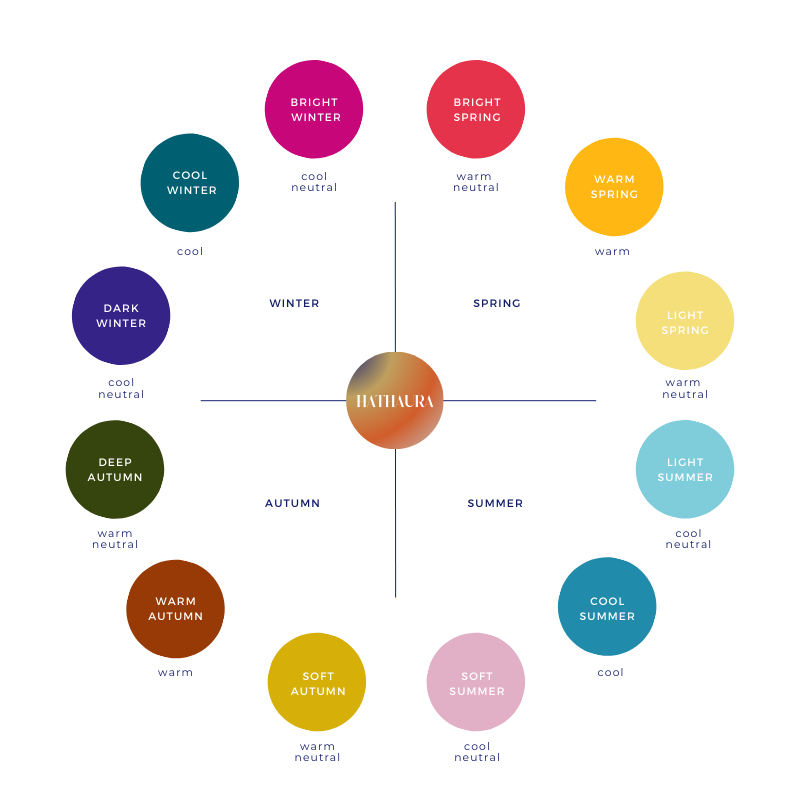
What's the 12-season system?
It expands the classic four seasons (Spring, Summer, Autumn, Winter) into twelve sub-seasons based on temperature, value, and chroma — giving far more precise, wearable results than basic warm/cool sorting.
The Only Platform Built for Color Professionals
Generate branded PDF reports with your business name. Give clients a premium deliverable they'll keep forever.
Prices and features were accurate at the time of writing and may change. Always check each provider's site for current details.